Custom Software Development: A Complete Guide to Planning, Costs, Process & Business Benefits
 mindgridtechin@gmail.com

When Does Your Business Need Custom Software?
Most businesses do not set out to build custom software. They start with a spreadsheet, add a second tool, then a third. Orders arrive by email, customer details sit in one system, invoices sit in another, and someone on the team spends part of every day copying information between them.
For a while this works. Then the cracks show. Reports take hours to put together. The same data is typed twice and does not match. A new hire needs a week to learn which tool does what. And the software you pay for does almost everything you need, except the one workflow that matters most to your business.
That is the point where custom software starts to make sense. This guide explains what it is, how it differs from ready-made software, when it is worth the investment, how a project runs from idea to launch, what drives cost and time, how to choose a development partner and how to measure the return. It also covers questions many guides skip, such as who owns the source code and which mistakes cause projects to fail.
Use it to decide whether custom software is right for your business and, if it is, to plan it with confidence. If you already know you want to talk to a team, see our custom software development services.
What Is Custom Software Development?
Custom software development is the process of designing, building, testing and maintaining software for one specific business: its workflows, its users and its existing systems. The alternative is buying a ready-made product designed for thousands of customers at once. You will also see it called custom application development or custom business software.
How custom software is different from ready-made software
Ready-made software, such as a standard accounting package or a general CRM, is built once and sold to many companies. You adapt your process to fit the product. With custom software the product adapts to your process. You decide what it does, how it looks, which systems it connects to and how it grows.
Custom software vs bespoke software development: are they the same?
In practice, yes. “Bespoke” is more common in British English and “custom” is more common elsewhere. Some people use bespoke software development for software built entirely from scratch and custom for software that also reuses existing platforms. Whichever word a vendor uses, ask what will be built from scratch and what will reuse existing components. That answer affects cost, speed and ownership.
Examples of custom-built business applications
- A patient appointment portal for a clinic
- A school management system that handles attendance, grades and parent messages
- An order and inventory system for a distributor
- A client portal where customers see invoices and project status
- An internal dashboard that pulls sales data from three tools into one view
- A mobile app for field staff who work away from a desk
Who typically needs custom software?
Custom software suits businesses whose way of working is part of how they compete, businesses that have outgrown generic tools, and businesses with unusual workflows, several systems to connect or sensitive data to protect. It also suits founders building a digital product to sell. Not every business needs it, and sections 3 and 6 will help you decide. Smaller companies can benefit too. Read more in our guide to custom software development for small businesses [/blog/custom-software-development-for-small-businesses/].
How Does Custom Software Work in a Real Business?
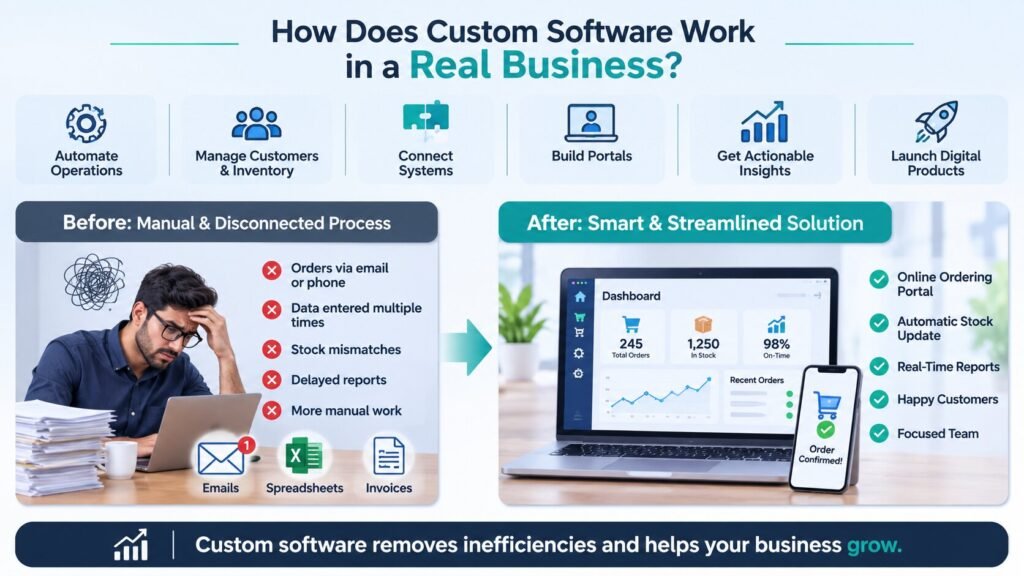
Custom software is easiest to understand through the jobs it does. These are the most common ones.
Automating internal business operations. Approvals, scheduling, reminders, document creation and report generation happen automatically instead of by hand.
Managing customers, orders and inventory. One system holds the customer record, the order and the stock level, so nobody has to reconcile three spreadsheets.
Connecting multiple business systems. Software links your tools through their interfaces (APIs), so data entered once appears everywhere it is needed.
Building customer and employee portals. People log in to see documents, place requests, track progress or update their details without phoning or emailing your team.
Creating business dashboards and reporting tools. Live numbers from several sources appear in one place, so decisions rest on current data.
Developing digital products and SaaS platforms. The software itself becomes the product you sell, with accounts, subscriptions and billing built in.
A practical example: before and after
Take a distribution company that sells to trade customers. This is an illustration, not a client result.
Before: Customers email or phone their orders. A staff member re-types each order into a spreadsheet, checks stock in a second file, then writes the invoice by hand in the accounting package. Mistyped numbers cause errors. Customers call to ask where their order is. The manager waits until the end of the week for a sales report.
After: Customers log in to a portal and place orders themselves. The system checks stock as they order, creates the invoice, sends the data to the accounting package and alerts the warehouse. Customers see the order status without calling. The manager opens a dashboard and sees the day’s sales and stock levels. Staff spend their time on exceptions rather than on typing.
The software did not make the business bigger. It removed repeated work and gave people better information.
Custom Software vs Off-the-Shelf Software vs Low-Code Platforms
You have three main routes to software, and each one is right in some situations.
Custom software is built to your requirements by a development team.
Off-the-shelf software (also called commercial off-the-shelf, or COTS) is a ready-made product you use under the vendor’s licence or subscription terms.
Low-code and no-code platforms let you assemble applications from visual building blocks with little or no programming.
How they compare
Initial investment
Custom: the highest upfront cost. Off-the-shelf: the lowest upfront cost, usually a licence fee or a subscription per user. Low-code: moderate, with platform fees plus build time.
Development time
Custom: the longest, because planning and building take time. Off-the-shelf: the fastest, ready after setup. Low-code: fast for simple applications.
Customisation
Custom: high, within technical and budget constraints. Off-the-shelf: limited to settings, configuration and add-ons. Low-code: good within the platform’s limits.
Integration capabilities
Custom: built around your systems, though third-party components can still set limits. Off-the-shelf: depends on the vendor’s connectors. Low-code: depends on the platform. Some support complex integrations and others do not.
Ownership and control
Custom: you can own the code if your contract says so. Off-the-shelf: you use it under the vendor’s licensing or subscription terms. Low-code: the platform vendor controls where and how your app runs, so moving away can mean rebuilding.
Maintenance
Custom: your responsibility, or your partner’s under a support plan. Off-the-shelf: the vendor handles updates. Low-code: the platform handles updates and you maintain your own app logic.
Long-term flexibility
Custom: greater control over features and development direction. Off-the-shelf: depends on the vendor’s roadmap. Low-code: depends on what the platform can do.
When should you build, buy or use low-code?
Buy when your need is common, such as accounting, payroll or email marketing. If a good product exists and the process is not a competitive advantage, adapt your process to the tool.
Use low-code when the need is simple or internal, few people will use it, you need it quickly or you want to test an idea cheaply. Accept that you will work within the platform’s limits.
Build when the workflow is unique and central to your business, no product fits without heavy workarounds, you must connect several systems, you need control over data, security or the roadmap, or you are creating a product to sell. Also consider building when subscription costs for a growing team would exceed the cost of owning the software.
Three realistic scenarios:
- A café group needs payroll. Buy.
- A department needs a simple internal approval form. Use low-code.
- A logistics firm has its own routing rules and wants a customer portal. Build.
Many businesses combine the approaches. They buy standard tools and build the layer that connects them or the one feature nothing else provides. If you think building is the right route, our custom software development services [/services/custom-software/] page explains how to start.
Types of Custom Software Businesses Can Develop
4.1 Enterprise Resource Planning (ERP) systems
Purpose: run core operations in one system. Common features: finance, purchasing, inventory, HR and reporting. Use case: a manufacturer that links purchasing, production and accounting.
4.2 Customer Relationship Management (CRM) systems
Purpose: track customers and sales. Common features: contact records, sales pipeline, follow-up reminders and communication history. Use case: a service company with an unusual quoting process that standard CRMs handle badly.
4.3 Inventory and order management software
Purpose: keep stock and orders accurate. Common features: stock levels, purchase orders, order tracking and supplier records. Use case: a retailer selling in store and online from the same stock.
4.4 Business process automation software
Purpose: replace repeated manual steps. Common features: approvals, notifications, document creation and automatic data transfer. Use case: employee onboarding that triggers accounts, equipment and training tasks.
4.5 Customer and employee portals
Purpose: give people secure access to information and actions. Common features: accounts, documents, requests and messaging. Use case: a clinic’s patient portal or a staff leave-request portal.
4.6 Web-based business applications
Purpose: deliver software through a browser on any device, with nothing to install. Common features: user roles, dashboards, forms and reports. Use case: an internal tool that field teams and head office both use.
4.7 Mobile business applications
Purpose: put tools in the hands of people who work away from a desk. Common features: offline use, camera and location features, notifications. Use case: delivery drivers, field engineers or a customer booking app. See our mobile app development services [/services/mobile-app-development].
4.8 SaaS platforms and digital products
Purpose: software you sell to others. Common features: customer accounts, subscriptions, billing and an admin area. Use case: a startup turning a service into a subscription product.
4.9 Industry-specific business software
Purpose: handle the workflows and rules of one sector. Common features: depend on the industry, such as appointments in healthcare or grading in education. Use case: a school management platform or a loan application system.
4.10 Reporting dashboards and analytics systems
Purpose: turn scattered data into live numbers. Common features: data connections, charts, filters and scheduled reports. Use case: a manager who needs sales, stock and support figures in one view.
Key Benefits and Limitations of Custom Software Development
Benefits
- Software aligned with business workflows. Staff follow your process, not the product’s.
- Integration with existing systems. Data moves between tools without re-typing.
- Greater control over features. You choose what is built and in what order.
- Flexible development and future changes. The software can change as the business does.
- Automation of repetitive processes. Time moves from data entry to work that needs judgment.
- Better visibility into business operations. Current information is available when decisions are made.
Potential limitations, and how to manage them
- Higher initial investment. Start with a focused first release and add features in phases. Compare the total cost over several years rather than the upfront price alone.
- Longer planning and development process. Invest in discovery so the build goes faster, and release in stages so benefits arrive early.
- Responsibility for maintenance. Budget for support from the start and agree a maintenance plan before launch.
- Dependence on technical expertise. Insist on clear documentation, mainstream technologies and ownership of the code, so you are never locked in to one supplier.
- Scope changes and project management challenges. Prioritise features, work in short cycles and agree how changes are requested, estimated and approved.
How to Know If Your Business Needs Custom Software
These signs suggest it is time to consider custom software:
- Your team relies heavily on spreadsheets
- Employees repeatedly enter the same information
- Existing software cannot support important workflows
- Your systems do not communicate with each other
- Subscription costs are increasing
- Manual processes create errors and delays
- Your business needs a digital product that standard tools cannot provide
Custom Software Readiness Checklist
Answer these honestly. The more questions you can answer yes to, the more ready you are.
- Can you describe the problem in one or two sentences?
- Do you know who would use the software and how often?
- Have you checked whether an existing product could solve it with reasonable workarounds?
- Do you know which systems it must connect to?
- Can you estimate what the problem costs you now in time or money?
- Is one person able to make decisions and answer questions during the project?
- Can you fund both the build and ongoing maintenance?
- Is the process stable enough to automate? Automating a messy process only makes the mess faster.
If you answered no to several, spend time on the problem before you spend money on a solution. A good development partner will help you with that step.
The Custom Software Development Process: From Idea to Launch
Every project differs, but the custom software development process usually follows nine steps. For each one, here is what happens, why it matters, what you should prepare and what you should receive.
Step 1: Business discovery and requirement analysis
What happens: the team interviews users, reviews your current process and systems, and writes down the problem.
Why it matters: wrong requirements are the most expensive mistake in software.
What to prepare: process notes, samples of your spreadsheets and reports, and a list of people affected.
What you receive: a requirements document that states the problem and the needs.
Step 2: Project scope and feature prioritisation
What happens: features are sorted into must-have, should-have and later.
Why it matters: it keeps the first release focused and the budget under control.
What to prepare: your goals, how you will measure success and a budget range.
What you receive: a prioritised feature list, a release plan and an estimate.
Step 3: Technical feasibility and architecture planning
What happens: engineers check risks, integrations and data needs, then decide how the system should be structured.
Why it matters: technical problems found now are far cheaper than problems found during the build.
What to prepare: access to documentation for any system you will connect, plus security and data requirements.
What you receive: an architecture overview, an integration plan and a risk list.
Step 4: UI/UX design and prototyping
What happens: designers create wireframes and a clickable prototype.
Why it matters: users find problems on screen, which is cheaper than finding them in code.
What to prepare: a few real users who can test the prototype and your brand assets.
What you receive: wireframes, a clickable prototype and design files.
Step 5: Technology stack selection
What happens: the team chooses languages, frameworks, databases and hosting based on your requirements.
Why it matters: these choices affect cost, speed, security and hiring for years.
What to prepare: any standards you already follow, such as a Microsoft environment or a preferred cloud provider.
What you receive: a written technology decision with the reasons for it.
Step 6: Software development and integration
What happens: the team builds in short cycles and connects your other systems.
Why it matters: regular working demos let you steer before mistakes grow.
What to prepare: a decision-maker who can give feedback quickly, and test data.
What you receive: working increments each cycle, source code in a shared repository and progress reports.
Step 7: Testing and quality assurance
What happens: the team tests features, performance and security, and your users try the software on real scenarios.
Why it matters: defects are found before your customers find them.
What to prepare: real scenarios and testers from your team.
What you receive: a test report, fixed defects and a sign-off.
Step 8: Deployment and launch
What happens: the production environment is set up, data is migrated, users are trained and the software goes live.
Why it matters: a planned switchover avoids downtime and confusion.
What to prepare: a data migration plan, time for staff training and a fallback plan.
What you receive: the live system, user guides and training.
Step 9: Maintenance and continuous improvement
What happens: the team monitors the system, fixes problems, applies updates and adds features based on feedback.
Why it matters: software that is not maintained gradually breaks or becomes unsafe.
What to prepare: a support plan, a budget and a way for users to send feedback.
What you receive: ongoing support, updates and a roadmap of improvements.
Teams may describe these stages as a software development lifecycle. The names change from company to company, but the order of work is much the same.
How Much Does Custom Software Development Cost?
The honest answer is that custom software development cost depends on the project. Two projects with the same name, such as “customer portal”, can differ enormously in scope. A single price range would mislead you, so this section explains what drives cost instead.
How scope affects cost
Basic application: limited features, few user roles, simple data handling.
Mid-sized business system: multiple workflows, integrations, permissions and reporting.
Complex enterprise platform: multiple modules, advanced integrations, extensive security and infrastructure requirements.
Main factors that influence development costs
- Project complexity: how many rules, workflows and exceptions the software must handle
- Number of features and user roles: each role usually needs its own screens and permissions
- UI/UX design requirements: a simple internal tool needs less design than a public product
- Third-party integrations: each connected system adds work and testing
- Web and mobile platform requirements: building for web, iOS and Android costs more than one platform
- Security and data requirements: sensitive or regulated data needs extra controls and testing
- Development team and location: team size, experience and rates all affect the price
- Maintenance and infrastructure: hosting, monitoring and support continue after launch
One-time costs vs ongoing costs
One-time costs include discovery, design, development, testing, data migration and launch. Ongoing costs include hosting, licences for third-party services, security updates, bug fixes, support and new features. Many budgets cover only the first group. Plan for both.
Hidden costs businesses should consider
- Data migration and cleaning from old systems
- Third-party licences and API usage fees
- Training and the time staff spend learning the new system
- Changes in how teams work once the software goes live
- Hosting growth as the number of users grows
- Security reviews and compliance work
- Rework caused by changing requirements mid-project
- Your own team’s time for workshops, feedback and testing
How to prepare a realistic software development budget
- Define the problem and the result you want before you ask for prices.
- Rank features and fund the must-haves first.
- Consider an MVP so you spend on proven needs (see section 10).
- Ask for an itemised estimate, not one total.
- Add a contingency for changes, because requirements always shift.
- Look at total cost over three years, including maintenance.
Ask how the price is set. Fixed-price contracts give certainty when scope is clear. Time-and-materials contracts give flexibility when scope will change.
Project-specific estimates are more useful than universal ranges because they reflect your scope, your systems and your risks.
How Long Does It Take to Develop Custom Software?
Timelines depend on scope, so be wary of any promise made before discovery. A focused first release is usually measured in weeks to months, and larger systems take longer. These stages make up the schedule:
- Discovery and planning: understanding the problem and agreeing the scope
- Design and prototyping: designing screens and testing them with users
- MVP development: building the smallest useful version
- Full-featured application development: adding the remaining features in cycles
- Testing and deployment: final quality checks, data migration and launch
What influences delivery time
- The size of the scope and the number of integrations
- The number of user roles and the complexity of the rules
- How clear the requirements are at the start
- How quickly your team gives feedback and decisions
- The amount of data to migrate
- The size and experience of the development team
Decisions made slowly are one of the most common causes of delay, and they sit on the client’s side. Naming one decision-maker early shortens projects more than most technical choices do.
MVP vs Full Product: What Should You Build First?
What is a Minimum Viable Product (MVP)?
An MVP is the smallest version of the software that lets real users complete the main job it exists for. It is not a rough or broken version. It is a focused one.
Why launching with essential features can be useful
- You reach real users sooner and learn what they actually need
- You spend money on features that prove their value
- Problems appear while they are still cheap to fix
- Teams start getting benefit earlier
How to identify must-have features
Ask: what is the shortest path for a user to finish the core task, and which features can they not do without? Everything else is a candidate for later. A simple method is to sort features into must have, should have, could have and not now.
How to prioritise future functionality
Rank features by the value they add and the effort they need. Use feedback and usage data from the first release rather than opinions in a meeting room.
When an MVP may not be suitable
- Safety-critical or heavily regulated systems that must meet requirements from day one
- Replacements for an existing system where users need full parity on launch
- Software where a partial release would damage trust
How to validate the product with real users
Release to a small pilot group, watch how they use it, interview them and track a few simple measures such as tasks completed and time saved.
Choosing the Right Technology Stack for Custom Software
A technology stack is the set of tools used to build and run your software. These are common choices.
Frontend technologies
- React: a popular library for building interactive interfaces
- Next.js: a framework built on React that supports server-side rendering and search-friendly pages
Backend technologies
- Java: a mature option for large enterprise systems
- .NET and C#: a common fit for businesses that use Microsoft tools such as Azure and Office 365
- Node.js: JavaScript on the server, popular for web apps and APIs
Databases and data management
- MongoDB: a flexible document database
- Relational databases such as PostgreSQL, MySQL or SQL Server: well suited to structured data with clear relationships
Cloud and infrastructure
- AWS, Microsoft Azure and Google Cloud: the three main cloud platforms
No technology is best for every project, and none guarantees speed, reliability or security by itself. Technology selection should follow the application’s functional requirements, expected user load, integration needs, development budget, existing infrastructure and long-term maintenance requirements. Popularity alone is a poor reason. For a starting point, try our free Tech Stack Advisor [/ai-tools/tech-stack-advisor].
Software Security, Data Protection and Compliance Considerations
Security should be designed in from the start, not added at the end. Ask any partner how they handle these areas:
- Authentication and access control: who can log in and what each person can see or do
- Data encryption: protecting data stored on servers and sent over networks
- Secure software development practices: code reviews, dependency checks and safe handling of inputs
- Backups and recovery planning: how data is restored if something goes wrong
- Security testing: checks for known weaknesses before launch and at intervals afterwards
- Data privacy considerations: collecting only the data you need and storing it appropriately
- Industry-specific regulatory requirements: rules that apply to your sector and location
Using security features does not automatically make an application legally compliant. Rules such as HIPAA, GDPR or PCI DSS depend on your industry, your location and the data you hold. Get qualified legal or compliance advice for your situation.
Who Owns Custom Software? Source Code, Intellectual Property and Contracts
Ownership is often settled by the contract, not by who paid. Agree these points in writing before work starts:
- Source code ownership: do you receive and own the full code?
- Intellectual property assignment: is the right to the work transferred to you, and when?
- Third-party and open-source licences: which components are used and under what terms?
- Hosting and cloud account ownership: are the servers and accounts in your name?
- Documentation and technical handover: will you receive documentation so another team could take over?
- Vendor agreements and exit planning: what happens if the relationship ends?
Seek appropriate legal advice for contracts and intellectual property arrangements. A little care here can prevent serious disputes later.
How to Choose a Custom Software Development Company
When you compare a custom software development company, look for these qualities:
- Relevant technical expertise for your type of project
- A clear understanding of your business requirements, not just the technology
- A defined discovery and planning process
- Open communication and project transparency
- A clear testing and quality assurance approach
- Sound security practices
- Documentation and handover included
- Maintenance and post-launch support
- A portfolio and case studies you can verify
Questions to ask before hiring a software development partner
- Who will actually work on my project, and what is their experience?
- How do you run discovery, and what do I receive from it?
- How is the price set, and what is and is not included?
- How do you handle changes to scope?
- How often will I see working software?
- How do you test, and who signs off?
- How do you protect my data and handle security?
- Who owns the source code, designs and accounts when the project ends?
- What documentation and handover do you provide?
- What support and maintenance do you offer after launch?
- Can I speak to a previous client in a similar situation?
- What would make you tell me not to build this?
The last question is worth asking. A good partner will tell you when a simpler solution is better.
Thinking about a project of your own? Contact our team [/contact] to talk through your requirements.
How to Measure the ROI of Custom Software
Return on investment compares the value the software creates with what it costs. Value usually comes from:
- Time saved through automation
- Reduction in manual errors
- Reduced software subscription costs
- Improved operational visibility
- Customer experience improvements
- New revenue opportunities
A simple custom software ROI calculation
ROI (%) = (total benefit – total cost) / total cost x 100
Measure over several years, not one. Software costs most in the first year and pays back over time.
Hypothetical example. All amounts are illustrative, use US dollars (USD) throughout, and are not a price quote or a MindGridTech client result.
Suppose 6 staff each spend 5 hours a week on manual data entry that a system would remove. Their time is valued at USD 15 per hour.
Time saved: 6 x 5 x 15 x 52 = USD 23,400 a year.
Rework from errors avoided: USD 4,000 a year.
Subscriptions replaced: USD 3,000 a year.
Total yearly benefit: USD 30,400.
Suppose the build costs USD 40,000 and hosting plus maintenance cost USD 6,000 a year.
Over three years the benefit is USD 91,200 and the cost is 40,000 + (3 x 6,000) = USD 58,000.
ROI = (91,200 – 58,000) / 58,000 x 100 = about 57%.
Payback: 40,000 / (30,400 – 6,000) = about 1.6 years, or around 20 months.
Notice that the project loses money in the first year and wins over three. State your assumptions openly, replace the invented numbers with your own, and test the results against reality after launch. To try your own figures, use our free ROI Calculator [/ai-tools/roi-calculator].
Common Custom Software Development Mistakes to Avoid
- Starting development without clear requirements
- Building too many features in the first release
- Choosing technology before understanding the problem
- Ignoring user feedback
- Underestimating integration complexity
- Overlooking security and maintenance
- Failing to define ownership and handover
- Not measuring project outcomes
Almost every item on this list is avoided by the same habits: a proper discovery phase, a focused first release, regular demos and agreed success measures.
The Future of Custom Software Development
Several developments are already changing how software is built and used:
- AI-assisted software development: tools that help developers write, review and test code faster, with human review still essential
- Workflow automation: connecting systems so routine work runs without manual steps
- API-first application architecture: designing software around interfaces so it connects easily to other tools
- Cloud-native applications: software built to run and scale on cloud platforms
- Data-driven business platforms: applications that use your own data for reporting and decisions
- Intelligent business applications: features such as search, summaries and recommendations added to everyday tools
The practical lesson is to build on solid foundations: clear data, open interfaces and good security. Those make it easier to add new capabilities later.
How MindGridTech Supports Custom Software Development
MindGridTech helps businesses plan and develop software solutions based on their operational requirements. Our services include custom business applications, web and mobile application development, API integrations, workflow automation, technology consulting and cloud infrastructure support.
We focus on understanding the business problem, identifying suitable technologies and developing solutions around the project’s requirements. From initial planning to implementation and ongoing improvements, our approach is designed to support practical business needs.
If you are considering a custom software project, explore our custom software development services or contact our team to discuss your requirements.
Frequently Asked Questions
- What is custom software development in simple terms?
It is building software for one business and its way of working, instead of buying a product made for everyone. - What is the difference between custom software and off-the-shelf software?
Off-the-shelf software is ready-made and shared by many customers. Custom software is built to your requirements, so it fits your process, but it costs more upfront and takes longer. - Is custom software suitable for small businesses?
It can be, especially when a key workflow does not fit standard tools. Start small with a focused first release rather than a large system. - How much does custom software development cost?
It depends on complexity, features, integrations, platforms, security needs and maintenance. A project-specific estimate after discovery is more reliable than a general range. - How long does it take to develop custom software?
It depends on scope. A focused first release is often measured in weeks to months, while larger systems take longer. - What are the main stages of software development?
Discovery, scoping, architecture, design, technology selection, development, testing, deployment and ongoing maintenance. - Who owns the source code of custom software?
Whoever your contract says. Agree code ownership, intellectual property assignment and handover in writing before work starts, and take legal advice. - Can custom software integrate with existing business systems?
Yes, usually through their APIs or data exports. Integration complexity affects cost and time, so list the systems early. - What is the difference between an MVP and a full software product?
An MVP is the smallest version that lets users complete the core task. A full product adds the further features you prioritise after real use. - How do I choose a custom software development company?
Look for relevant experience, a clear process, transparent communication, security practices, ownership terms and support after launch, and speak to past clients. - Does custom software require ongoing maintenance?
Yes. It needs updates, security patches, hosting, bug fixes and improvements. Budget for maintenance from the start. - Is custom software better than low-code development?
Neither is better in every case. Low-code suits simple or internal tools. Custom software suits complex, unique or product-level needs where control and integration matter.
Conclusion: Build Software Around the Way Your Business Works
Custom software is worth considering when generic tools force you to work around them, when your systems do not talk to each other, or when software itself is your product. It is not the right answer for every problem, and a good partner will say so.
If you are deciding, follow these steps. Define the problem in one or two sentences. Check whether a bought or low-code tool can solve it. If not, start with a focused first release, budget for maintenance, agree ownership in writing and measure the result against your starting numbers.
When you are ready to talk about your project, explore our custom software development services.

mindgridtechin@gmail.com
Author at MindGridTech
Need help with your technology?
Get a free 30-minute consultation with our team — no commitment required.
Get a Free Quote →