Custom Software vs Off-the-Shelf Software: How to Choose the Right Solution
 Dinesh BC

A growing business often starts with spreadsheets and ready-made applications to manage customers, orders and daily operations. At first this works well. As the business expands, those tools may no longer support its workflows efficiently. Data gets copied between systems, reports take longer to build and staff work around the software instead of with it. The company then faces a decision: continue with existing software or invest in a custom solution?
That decision is the heart of custom software vs off-the-shelf. Custom software is built around your specific requirements. Off-the-shelf software, also called ready-made or commercial software, is a finished product designed for a broad market. Neither is automatically better. The right choice depends on your requirements, budget, internal resources and long-term plans.
This guide explains both options, compares them side by side, looks at costs over time and gives you a simple framework to decide. For the wider picture of how custom projects work, read our custom software development guide .
What Is Custom Software?
Custom software is software developed around specific business requirements. It is designed for particular workflows, users and operational needs, with features chosen according to the project scope and integrated with the business systems you already use. You will also see it called bespoke software or custom application development. In the bespoke software vs off-the-shelf debate, the two terms for the custom side mean much the same thing in practice.
Examples of Custom Software
- Custom CRM Systems: Manage leads, track sales opportunities, and build stronger customer relationships with software tailored to your sales process.
- Inventory and Warehouse Management Software: Track stock levels, manage warehouse operations, and streamline inventory management.
- Business Process Automation Applications: Automate repetitive tasks, simplify workflows, and improve overall business efficiency.
- Employee Management Portals: Manage employee records, attendance, leave requests, and HR operations in one place.
- Customer Self-Service Portals: Allow customers to access information, manage accounts, submit requests, and find support independently.
- Custom ERP Solutions: Connect finance, operations, inventory, and other business functions through one integrated system.
- Industry-Specific Business Applications: Build specialized software designed around your industry’s unique needs and workflows.
Advantages of Custom Software
- Tailored business workflows: The software follows your process instead of forcing you to change it.
- Greater control over functionality: You decide what is built.
- Integration based on business requirements: It can connect to the systems you actually use.
- Ability to expand functionality over time: New features can be added as the business grows.
- Greater control over development priorities: Your needs set the roadmap, not a vendor’s.
Disadvantages of Custom Software
- Higher Initial Development Investment: Custom software often requires a higher upfront investment compared to adopting an existing off-the-shelf product.
- Longer Development Process: Building software from scratch can take more time than implementing an already available solution.
- Vendor Relationships and Software Ownership: Your business needs to manage vendor relationships and clearly define software ownership arrangements.
- Technical Planning and Ongoing Maintenance: Proper technical planning, regular updates, security improvements, and ongoing maintenance are essential.
For smaller companies weighing this up, see our guide to custom software development for small businesses.
What Is Off-the-Shelf Software?
Off-the-shelf software is prebuilt software designed for a broad market. It offers standard features for common business needs and is usually accessed through a subscription or a licence. Depending on the product, the vendor manages updates and infrastructure. Commonly used examples include Microsoft 365, Salesforce, QuickBooks, Shopify, Trello and HubSpot.
Examples of Off-the-Shelf Software
- Microsoft 365: For business email, document management, and team collaboration.
- Salesforce and HubSpot: For customer relationship management, sales tracking, and lead management.
- QuickBooks: For accounting, invoicing, expense tracking, and financial management.
- Shopify: For online store management, eCommerce operations, and order processing.
- Trello: For task management, project tracking, and team collaboration.
Advantages of Off-the-Shelf Software
- Faster Initial Adoption: Get started quickly with ready-made software that requires less development time.
- Existing Features and Established Workflows: Access built-in features and proven workflows without having to develop everything from scratch.
- Lower Initial Investment: Reduce upfront costs by choosing an existing software solution in many cases.
- Vendor-Provided Updates and Support: Benefit from regular software updates, security improvements, and technical support provided by the vendor.
- Documentation and User Communities: Access product documentation, tutorials, and user communities for guidance and troubleshooting.
Disadvantages of Off-the-Shelf Software
- Limited Control Over Product Functionality: You have limited flexibility to modify existing features or introduce functionality beyond what the software provides.
- Features May Not Match Every Business Process: Standard software may not fully support your unique workflows, operational needs, or business requirements.
- Accumulating Subscription and Licensing Costs: Recurring subscription fees, licensing charges, and additional user costs can increase over time.
- Limited or Expensive Customisation: Adapting the software to your specific requirements may be restricted, costly, or dependent on vendor approval.
- Dependency on the Vendor: Your business depends on the vendor’s product roadmap, ongoing support, and service availability.
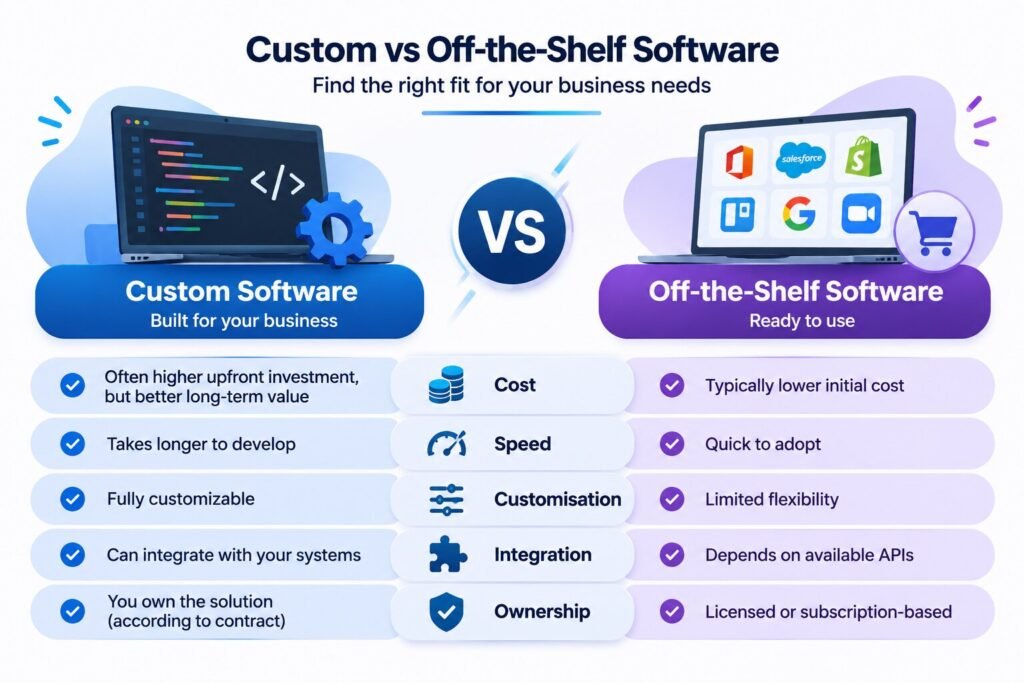
Custom Software vs Off-the-Shelf Software: Key Differences
This table compares custom software vs ready-made software across the factors that matter most.
| Comparison Factor | Custom Software | Off-the-Shelf Software |
|---|---|---|
| Development | Built around specific requirements | Already developed |
| Initial Cost | Often higher | Often lower |
| Implementation | Requires development and deployment | Usually faster to adopt |
| Customisation | Greater control over functionality | Limited by product capabilities |
| Scalability | Can be designed around expected growth | Depends on vendor plans and product limits |
| Integration | Can be developed for required systems | Depends on available APIs and integrations |
| Maintenance | Arranged by the business or development partner | Usually handled by the vendor, within service terms |
| Ownership | Depends on contract and IP arrangements | Governed by licence or subscription terms |
| Security | Depends on design, implementation and maintenance | Depends on vendor security practices and configuration |
| Flexibility | Greater control over changes | Subject to vendor capabilities |
| Vendor Dependency | Depends on architecture and support arrangements | Often tied to the software provider |
No row in this table decides the question alone. The right choice depends on your requirements, your budget, the technical resources you have and where the business is heading. A company with simple needs and limited time may reasonably favour the right-hand column. A company whose process is unusual may favour the left.
Cost Comparison: Custom Software vs Off-the-Shelf Software
Cost is where many decisions go wrong, because the two options charge in different ways. This section explains the differences without quoting prices. For a full breakdown of custom pricing, read our guide to custom software development cost.
Initial Development and Setup Costs
Custom software: discovery, design, development and testing are paid for before you use the software.
Off-the-shelf software: licensing or subscription fees, plus configuration and implementation costs such as setup, data import and staff training.
Ongoing Costs
Custom software: maintenance, hosting, security updates and support.
Off-the-shelf software: subscription renewals, user-based licensing that grows as the team grows, paid add-ons and integrations, and support or upgrade costs.
Total Cost of Ownership
Comparing only the first invoice is a common mistake. Total cost of ownership adds everything you pay over the life of the software:
Total cost of ownership = setup cost + (yearly running costs x number of years)
Look at three to five years, and include the costs that grow as the business grows.
A hypothetical example
This example is illustrative. It is not a MindGridTech project and shows no real prices. The numbers are budget units that can stand for any currency.
Suppose a company with a growing team compares two options over five years.
Off-the-shelf option: setup of 10 units in year one. Subscription cost grows with the number of users: 20 units in year one, then 30, 40, 50 and 60. Add-ons and integrations cost 5 units a year, and support and training cost 3 units a year.
Custom option: a build cost of 100 units in year one, then 12 units a year for hosting, support and updates.
| Year | Off-the-shelf, cumulative | Custom, cumulative |
|---|---|---|
| 1 | 38 | 112 |
| 2 | 76 | 124 |
| 3 | 124 | 136 |
| 4 | 182 | 148 |
| 5 | 250 | 160 |
In this example the ready-made product is cheaper for the first three years and the custom software becomes cheaper in year four. That is only because the subscription grows with the team. If the team stayed the same size, the off-the-shelf option would stay cheaper for much longer. The example also leaves out the value of a better workflow fit and the time staff spend on workarounds, and it assumes custom running costs stay flat. Replace these numbers with your own, and use our ROI Calculator to calculate potential business ROI.
Custom Software vs Off-the-Shelf: Which Is Better for Different Businesses?
Startups and New Businesses
Ready-made tools are often suitable for validating an idea quickly and cheaply. Custom development may become useful when workflows or product requirements become more specialised, or when the software itself is what you plan to sell.
Small and Medium-Sized Businesses
Standard software can handle common operations such as accounting, email and basic customer records. Custom applications may help when several disconnected systems create operational problems, for example when the same order is typed into three tools.
Growing Businesses
As users, orders and operational complexity increase, integration challenges appear. Growing businesses often need customised reporting and workflows that standard products cannot supply without heavy workarounds. A mixed approach often works here (see the hybrid section below).
Large Enterprises
Large organisations have complex business processes, several departments and many systems. Integration, security and access requirements are demanding, and some of these needs may call for custom enterprise applications, often alongside established enterprise platforms.
When Should You Choose Custom Software?
Custom development may be the better option when:
- Existing tools cannot support important business workflows
- Manual processes create repeated operational problems
- Multiple systems need to exchange data
- Standard products lack essential features
- The software is part of the company’s product or competitive offering
- Business requirements are expected to evolve
- The company needs greater control over functionality
Short decision checklist
Answer yes or no to each:
Several yeses suggest custom software deserves a serious look. If you are in that position, our custom software development services page explains how to start.
When Should You Choose Off-the-Shelf Software?
Buying an existing solution usually makes more sense when:
- Business requirements are common and straightforward
- An existing product already solves the problem
- Fast implementation is important
- Budget is limited
- Internal technical resources are limited
- The business does not need extensive customisation
- Vendor support and standard features are sufficient
Payroll, general accounting and email are good examples. Building your own version rarely makes sense, because a mature product already covers the need.
Can You Combine Custom Software and Off-the-Shelf Solutions?
Yes, and it is often the most practical answer. Businesses do not always need to choose only one. The build vs buy software question can have a blended answer.
Using Existing Software with Custom Integrations
- Connecting accounting software with a custom inventory system
- Connecting a CRM with a customer portal
- Automating data exchange between business applications
- Creating dashboards using information from multiple tools
If you are not sure where manual work is hiding, our Automation Scanner can help you find it, and the Workflow Generator can help you sketch an automated version.
Building Custom Applications Around Existing Platforms
A custom application can extend an existing system without replacing it. For example, you might keep your accounting package and build a custom portal where customers place orders, with the order data flowing into the accounting package automatically. You keep what works and build only what is missing.
When a Hybrid Approach Makes Sense
- Existing software handles standard functions
- Custom applications address unique requirements
- Integrations connect different systems
- The business avoids unnecessary redevelopment
Questions to Ask Before Choosing Your Software
Work through these questions with your team before you compare vendors.
- What business problem are we trying to solve?
- Can an existing product meet our requirements?
- Which features are essential?
- How many people will use the software?
- Do we need integrations with existing systems?
- What is our initial and long-term budget?
- Who will manage maintenance and support?
- What happens if our requirements change?
- Do we need control over source code and intellectual property?
- How will the solution support future business growth?
If you cannot answer the first three, pause. Define the problem before you look at solutions.
How to Make the Right Software Investment Decision
Step 1: Identify Your Business Requirements
Write down the problem, the people affected and the result you want. Separate essential requirements from nice-to-haves.
Step 2: Evaluate Existing Software Options
Shortlist ready-made products and test them against your essential requirements. Use trials and demonstrations rather than feature lists.
Step 3: Identify Missing Features and Limitations
Note what each product cannot do and how you would work around it. Estimate the time and cost of those workarounds.
Step 4: Compare Total Cost of Ownership
Compare custom and ready-made options over three to five years, using the method in the cost section. Include growth in users and costs.
Step 5: Assess Integration and Scalability Needs
List the systems the software must connect to and how much your usage may grow. If you are leaning towards a build, our free Tech Stack Advisor [https://mindgridtech.com/ai-tools/tech-stack-advisor] can help you choose a suitable technology stack.
Step 6: Select the Most Practical Approach
Choose the option, or the combination, that meets your essential requirements at a total cost you can sustain. Start small where you can, and review the decision as the business changes.
Frequently Asked Questions
What is the difference between custom software and off-the-shelf software?
Custom software is built for one business and its specific workflows. Off-the-shelf software is a ready-made product designed for many customers, with standard features and set licensing terms.
Is custom software better than ready-made software?
Not in every case. Custom software gives more control over features and workflows. Ready-made software is usually faster to adopt and often cheaper at the start. The better choice depends on your requirements.
Is custom software more expensive than off-the-shelf software?
Often more expensive upfront, but not always over time. Subscriptions can grow with your team, while custom software has maintenance costs. Compare total cost of ownership over several years.
Why do businesses choose custom software?
Usually because existing tools do not fit an important workflow, systems do not connect, or the software is part of the product or competitive offering.
What are the disadvantages of off-the-shelf software?
Limited control over functionality, features that may not match your processes, subscription costs that accumulate, limited customisation and dependence on the vendor’s roadmap.
Is off-the-shelf software suitable for small businesses?
Often, yes. For common needs such as accounting, email and basic customer records, ready-made tools are practical and quick to adopt.
Can off-the-shelf software be customised?
To a degree, through settings, add-ons and integrations. The limits depend on the product, and heavy customisation can be costly or restricted.
Who owns custom-developed software?
It depends on the contract and the intellectual property arrangements. Agree source code ownership and handover in writing, and take legal advice.
Is custom software easier to scale?
It can be designed around expected growth, but scalability depends on the design and the maintenance behind it. Ready-made software scales within the vendor’s plans and limits.
Can custom software integrate with existing applications?
Yes, typically through their APIs or data exports. Integration depends on what interfaces the existing applications offer.
How do I know when my business needs custom software?
Signs include workarounds for important workflows, repeated manual work, systems that do not exchange data, and missing essential features.
Can a business use both custom and off-the-shelf software?
Yes. Many businesses use ready-made tools for standard functions and custom applications or integrations for the parts that make them different.
Final Thoughts: Choosing the Right Software for Your Business
Custom software provides greater control over functionality and business-specific workflows. Off-the-shelf software provides a faster way to adopt established features. Both options have costs, limitations and benefits, and the best solution depends on your business requirements rather than on popularity or price alone.
Start with the problem, test existing products honestly, compare costs over several years and consider a hybrid approach before you commit.
Considering custom software for your business?
MindGridTech helps businesses evaluate their software requirements and explore solutions such as custom business applications, web development, API integrations and workflow automation.
If existing tools no longer support your business processes, our team can help you discuss a suitable development approach. Explore our custom software development services or contact our team.

Dinesh BC
Author at MindGridTech
Need help with your technology?
Get a free 30-minute consultation with our team — no commitment required.
Get a Free Quote →Related Articles
Custom Software vs Off-the-Shelf Software: How to Choose the Right Solution

Dinesh BC
November 25, 2026

How Much Does Custom Software Development Cost? A Complete Pricing Guide
Dinesh BC
November 24, 2026

Custom Software Development: A Complete Guide to Planning, Costs, Process & Business Benefits
Dinesh BC
November 23, 2026